Configure LDAP Authentication
This document is intended for a network administrator or
someone who is familiar with IIS, Active Directory and HTTPS.
General Overview:
By default, users and applicants are authenticated using credentials setup in AppliTrack. For clients with Active Directory networks, General ASP has created a web service that can be used to authenticate users and/or internal applicants using your existing network authentication. Using the LDAP authentication web service has several advantages:
1. AppliTrack Users configured to use external authentication do not need to remember a separate userid or password.
2. For users configured to use external authentication, AppliTrack is immediately aware of password changes, account lockouts, disabled accounts, etc. at the network.
3. Internal Applicants can be validated as “internal” using their network credentials.
This web service is intended to be accessed by AppliTrack servers for authentication of users and/or internal applicants. The web service first validates the requesting IP Address against values specified in the “appSettings” section of the web service configuration file (web.config). The “Configuration” section below details the “appSetting” keys. For security, the request must be made over HTTPS. If the requesting IP Address is valid and the request is over HTTPS, then the web service attempts to authenticate the username and password using the Active Directory domain and server specified in the configuration. If the authentication succeeds, the user is allowed access to AppliTrack.
Requirements:
1. Active Directory – your network must use Active Directory for authentication.
2. IIS Web Server - The web service must be served from an IIS web server that is accessible over HTTPS by General ASP servers and able to communicate with a domain controller that can authenticate your internal network users.
3. Your AppliTrack installation must be configured to use LDAP authentication. Currently, this is done by General ASP support staff. Once you have the web service configured and tested in your environment, please send us the URL of the web service. This URL must be accessible by AppliTrack web servers. Please see the “General ASP Support” section at the end of this document.
4. General ASP Test Account – If possible, General ASP will need a test user account in your Active Directory for testing and troubleshooting the authentication process. This user account does not need access to any network resources.
Installation:
Download the LDAPAuth webservice.
Unzip the archive and drop the files onto an existing IIS
website or application. If you put the LDAP code in the root website folder, the
web service would be available from the following URL:
“www.myexamplesite.com\LDAPAuth.asmx”
Once the web service is installed, you can browse to the “LDAPAuth.asmx” page. You should see a page similar to the following screenshot:
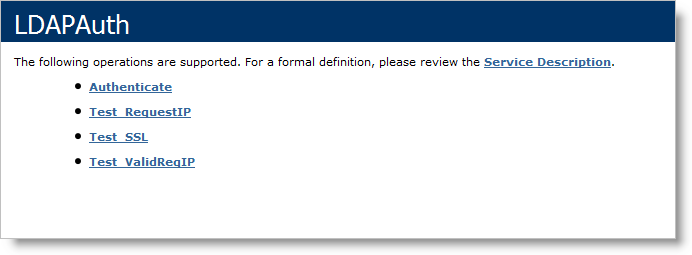
The “Test_” operations can be used to verify the requesting IP address, whether the requesting IP address is allowed and whether the request is coming over HTTPS. The “Authenticate” operation will take a username and password and attempt to authenticate against the Active Directory information in the web.config file (see below for configuration details). The “Authenticate” operation will return false regardless of the parameters given if the request if not over HTTPS or the request is not from an allowed IP address.
Configuration:
The “web.config” file contains three “appSettings” that need to be updated to reflect your network environment. Below, please find the default values for the key/value pairs in the “appSettings.”
<appSettings>
<add
key="ValidReqestingDomains"
value="69.65.0.245;69.65.0.246;69.65.0.247;69.65.24.60;69.65.24.62;75.15.57.105;75.15.57.106;127.0.0.1;"/>
<add
key
="ADDomain"
value="GENASP"/>
<add
key="ADServer"
value="LDAP://GENASPINT"/>
</
appSettings>
The “ValidRequestingDomains” key contains a list of semicolon separated IP Addresses and DNS entries. The IP Addresses and DNS entries in this list define access to this web service. The default list contains the values necessary for AppliTrack servers to access the web service. You may wish to add internal IP Addresses or DNS entries for testing.
The “ADDomain” key contains your domain name. This can be the NETBIOS name or FQDN for you domain.
The “ADServer” key contains the NETBIOS name or FQDN of a server that can authenticate users. For instance, a domain controller could be used for the “ADServer.”
General ASP Support:
Once you have the web service configured and tested in your environment, please send support@generalasp.com the URL of the web service and a test logon name and password. This URL must be accessible by AppliTrack web servers. We will update your AppliTrack installation to point to the newly configured web service in your network.
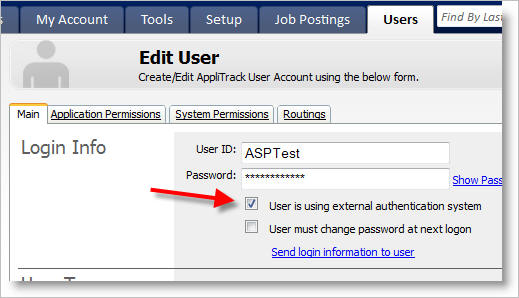
Once we have updated your installation, users in AppliTrack can be set to use either AppliTrack passwords or LDAP authentication. If a user account is set to use external authentication, the User ID must match the logon name for the user in your network. If applicable, General ASP can bulk update your existing user accounts to use the external authentication.
Additionally, if you are using the internal application features of AppliTrack, please specify whether you would like internal applicants to be required to authenticate using their network logon name and password. This option is available for the following Internal Application settings:
- “For Both Job IDs and Pools”
- “For Job IDs Only”
- “For Pools Only”
External authentication is not available for the “Simple” internal application.